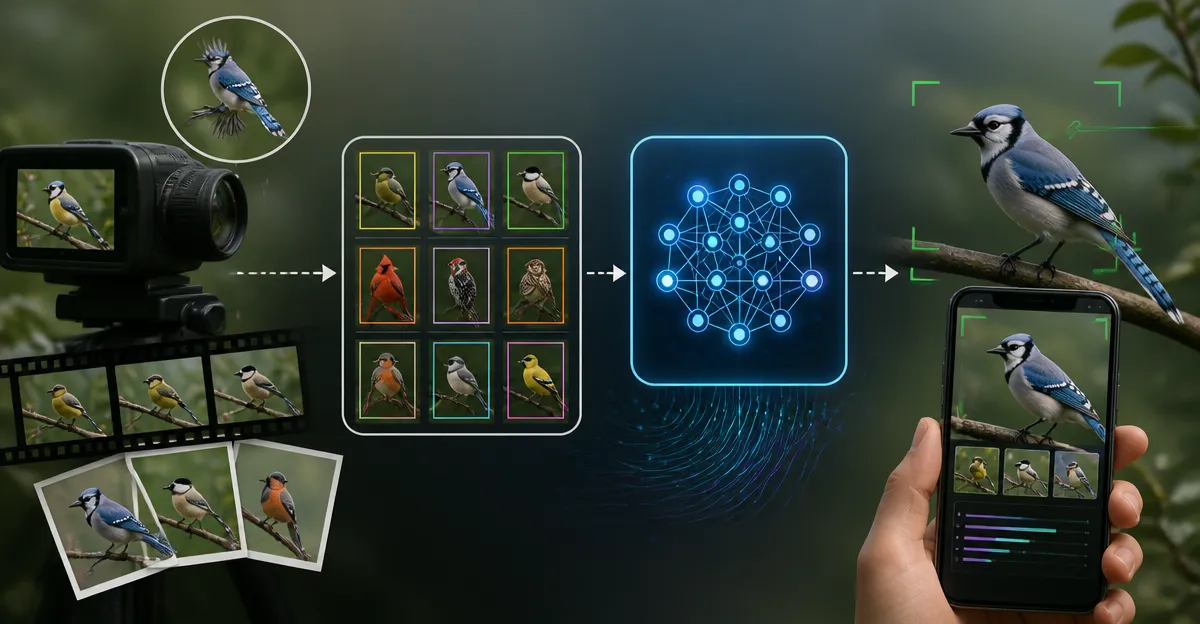
Introduction
One will discover how to transform personal video and photo collections into a powerful artificial intelligence model that can identify bird species in real time. The guide explains each phase of the workflow, from gathering raw media to deploying a trained model on a mobile device or web service. By following the instructions, the reader will acquire practical skills that are applicable to wildlife monitoring, citizen science projects, and personal hobbyist pursuits. The value lies in creating a reusable tool that reduces the time spent on manual identification and enhances the enjoyment of birdwatching.
What You'll Need
- High‑resolution camera or smartphone capable of recording 1080p video and RAW photos.
- Computer with a modern GPU (NVIDIA GTX 1660 or better) for model training.
- Python environment with libraries such as TensorFlow or PyTorch.
- Annotation software (e.g., LabelImg or CVAT).
- Reference bird identification books for accurate labeling.
The reference books listed below provide reliable field marks, range maps, and vocal descriptions that assist in creating high‑quality labels. Each book is available on Amazon and includes price and rating information to aid purchasing decisions.
Step 1: Gather High‑Quality Video and Photo Footage
The first step is to capture clear visual data of birds in the intended environment. One should use a tripod or a stable mount to avoid camera shake, and record during early morning or late afternoon when lighting is optimal. It is advisable to set the camera to a high frame rate (60 fps) if fast wing movements need to be analyzed later. For species that are common in a specific region, the National Geographic Backyard Birds Guide offers concise identification tips that help the photographer focus on distinctive field marks while shooting.
The guide is a paperback priced at $16.86, carries a 4.8‑star rating from 3,547 reviews, and is currently in stock. Its “Backyard Basics” section teaches readers how to attract birds with feeders and habitat enhancements, which can increase the likelihood of obtaining usable footage. By consulting the guide during field sessions, one can prioritize target species and adjust camera settings accordingly.
Step 2: Organize and Store Media Files
After collection, it is essential to store the media in a logical folder hierarchy that separates videos and photos by date, location, and habitat type. One should rename each file with a timestamp and a brief descriptor, for example, 2024-04-15_ElmPark_MourningDove_01.mp4. This practice simplifies later retrieval and reduces the risk of duplicate labeling. Cloud backup services such as Google Drive or Dropbox provide redundancy, but a local external SSD ensures fast access during training.
While organizing, it is helpful to cross‑reference the footage with the Peterson Birds of Eastern & Central N. America guide, which contains detailed range maps for each species. The hardcover edition costs $13.39, has a 4.8‑star rating from 2,167 reviews, and is in stock. Its well‑structured layout makes it easy to verify whether a photographed bird falls within the expected geographic range, thereby preventing mislabeling.
Step 3: Annotate Images and Video Frames
Annotation involves drawing bounding boxes around each bird and assigning the correct species label. Open‑source tools such as LabelImg allow one to load a single frame, draw rectangles, and export annotations in Pascal VOC or COCO format. For video, extract key frames at one‑second intervals using ffmpeg and annotate each frame individually. Consistency in labeling conventions (e.g., using scientific names versus common names) is crucial for model performance.
The Smithsonian Birds of North America East handbook provides comprehensive species accounts, including plumage variations and vocalizations. Priced at $30.15 with a 4.8‑star rating from 2,811 reviews, this flexibound volume is ideal for detailed verification of subtle field marks. Its full‑page photographs and annotated illustrations help annotators distinguish between visually similar species, thereby reducing label noise.
Step 4: Preprocess Data for Model Consumption
Preprocessing prepares the raw images for ingestion by the neural network. One should resize all images to a uniform dimension, such as 640 × 480 pixels, and normalize pixel values to the range [0, 1]. Data augmentation techniques—including random horizontal flips, rotation, and brightness adjustments—increase dataset diversity and improve model generalization. Scripts written in Python using the tf.image module or torchvision.transforms can automate these steps.
When dealing with regional species, the Birds of Florida Field Guide offers a color‑coded organization that assists in selecting appropriate augmentation parameters for bright tropical environments. This paperback costs $10.68, holds a 4.8‑star rating from 1,699 reviews, and is readily available. Its concise layout enables quick reference to the most common Florida birds, ensuring that augmentation does not create unrealistic color variations.
Step 5: Choose a Model Architecture
For bird identification, object detection models such as Faster R‑CNN, YOLOv5, or EfficientDet provide a balance between accuracy and inference speed. One should select an architecture that matches the intended deployment platform; for example, YOLOv5‑small runs efficiently on a laptop GPU, while Faster R‑CNN offers higher precision for research‑grade analysis. Transfer learning from a model pre‑trained on ImageNet accelerates convergence and reduces the amount of required labeled data.
The Sibley Guide to Birds serves as an exhaustive reference for over 800 North American species, making it valuable when expanding the label set beyond regional guides. This flexibound edition is priced at $20.84, carries a 4.8‑star rating from 2,858 reviews, and is in stock. Its detailed plumage plates help confirm that the model’s predicted classes align with accepted field identification standards.
Step 6: Train the Model
Training begins by configuring the loss function, optimizer, and learning rate schedule. One should monitor training and validation loss curves using TensorBoard or a similar dashboard to detect overfitting early. Early stopping based on validation accuracy prevents unnecessary epochs and conserves computational resources. It is advisable to reserve 20 % of the dataset for validation and another 10 % for a final test set.
During training, refer back to the reference guides to ensure that ambiguous cases are correctly represented in the dataset. For instance, if the model confuses a House Finch with a Purple Finch, the Sibley Guide provides side‑by‑side illustrations that highlight the subtle differences in wing coloration. Incorporating such nuanced examples improves the model’s discriminative capability.
Step 7: Evaluate Model Performance
Evaluation should include standard metrics such as mean Average Precision (mAP) at IoU thresholds of 0.5 and 0.75. One can also generate a confusion matrix to visualize which species are most frequently misidentified. Analyzing failure cases reveals gaps in the training data, prompting targeted data collection or additional augmentation.
If the confusion matrix shows systematic errors between species that share similar habitats, the Peterson guide’s range maps can be used to add geographic context as an auxiliary feature. This approach leverages the guide's detailed distribution information to bias predictions toward species that are actually present in the surveyed region.
Step 8: Deploy the Trained Model
Deployment options include a Python Flask API, a TensorFlow Lite model for mobile devices, or an edge‑computing device such as the NVIDIA Jetson Nano. One should convert the model to the appropriate format, test inference latency, and verify that the output classes match the original label taxonomy. Packaging the model with a simple user interface allows birdwatchers to upload a video clip and receive instant species predictions.
To support field users, include a quick‑reference sheet derived from the National Geographic guide that lists the top ten predicted species for the local area. This sheet can be printed on waterproof paper and attached to a field notebook, providing immediate context for the AI's suggestions.
Tips & Pro Tips
- Maintain consistent lighting conditions during recording to reduce variance in color representation.
- Use a dual‑lens smartphone to capture both wide‑angle context and close‑up details in the same session.
- When annotating, label both adult and juvenile plumages separately if the guide distinguishes them.
- Periodically update the training dataset with new observations to keep the model current with migration patterns.
- Leverage the “Backyard Basics” section of the National Geographic guide to attract a broader variety of species to the filming site.
Conclusion
One has now learned how to collect, annotate, preprocess, train, evaluate, and deploy a custom AI model for bird identification using personal video and photo footage. By integrating authoritative field guides such as the National Geographic, Peterson, Smithsonian, Florida, and Sibley books, the labeling process becomes more accurate and the resulting model more reliable. The workflow described can be adapted to other wildlife domains, demonstrating the flexibility of modern machine‑learning pipelines. Readers are encouraged to apply these steps to their own projects and contribute their findings to citizen‑science platforms.
Products Mentioned in This Guide
Frequently Asked Questions
What equipment is required to train a custom AI bird identification model?
You need a high‑resolution camera or smartphone for data capture, a computer with a modern GPU (e.g., NVIDIA GTX 1660 or better), and a Python environment with TensorFlow or PyTorch.
How do I prepare my video and photo data for training?
Collect clear 1080p video or RAW photos, then use annotation tools like LabelImg or CVAT to label each bird with its species based on reference guides.
Can the trained model run on mobile devices?
Yes; after training, you can export the model to TensorFlow Lite or ONNX format and deploy it to Android or iOS for real‑time identification.
What are the best practices for achieving high accuracy?
Use diverse, well‑lit footage, ensure consistent labeling, augment the dataset (flipping, rotation), and fine‑tune hyperparameters on a GPU‑accelerated system.
Is it possible to integrate the model into a web service?
Absolutely; host the model on a cloud server or use serverless functions, then expose an API that accepts images or video frames and returns species predictions.